# Building a tree with ReactiveHTML
**URL:** \
**Category:** Panel\
**Tags:** tree\
**Created:** [November 20, 2023, 6:07pm UTC](https://discourse.holoviz.org/t/building-a-tree-with-reactivehtml/6438 "2023-11-20T18:07:00Z")\
**Posts on this page:** 1\
**Page:** 1
Hello fellow Panel users,
I am building a data visualization app for work and I would like to represent certain parts of the app as a hierarchical tree. I’m familiar with JSTree and `panel-jstree` but I found the latter insufficiently flexible for what I wanted to do, and the documentation is quite sparse. Long story short, I decided to give `ReactiveHTML` a spin and implement the thing myself. Here’s what I came up with:
```python
import panel as pn
import param
from panel.reactive import ReactiveHTML
pn.extension()
class TreeNode(ReactiveHTML):
node_id = param.String()
children = param.List()
label = param.String()
toggled = param.Boolean()
open = param.Boolean()
def _toggle(self, event):
self.toggled = not self.toggled
self.toggle_children(self.toggled)
def _label_click(self, event):
pass
def _expand_children(self, event=None):
for child in self.children:
child.open = True
child._expand_children()
_template = """
{{label}}
{% for child in children %}
${child}
{% endfor %}
"""
_dom_events = {'checkbox': ['change']}
def _checkbox_change(self, event):
pass
def find_node(self, target_id):
for child in self.children:
if child.node_id == target_id:
return child
elif (result := child.find_node(target_id)) is not None:
return result
return None
def insert_node(self, node, parent_id):
parent = self.find_node(parent_id)
print(parent_id, parent)
if parent is not None:
parent.children.append(node)
def toggle_children(self, value):
for child in self.children:
child.toggled = value
child.toggle_children(value)
class TreeRoot(TreeNode):
_template = """
{% for child in children %}
${child}
{% endfor %}
"""
```
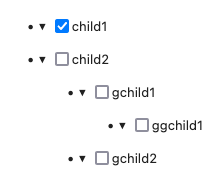
I had to break up the tree into a special root node and general nodes, because the nodes themselves need to be mapped to `
` elements but the overall outer wrapping starts with a `
`, so that breaks the recursivity. I’m sure there are other ways to do this using just divs and the appropriate JavaScript, but I’m not a JS expert so I haven’t bothered to figure out how to do that. Anyway, I hope this is useful to other people trying to build hierarchical representations in Panel. Happy to answer more questions about this.