\
**Category:** Panel\
**Tags:** panel\
**Created:** [August 23, 2023, 9:09pm UTC](https://discourse.holoviz.org/t/can-we-add-an-indicator-to-pn-pane-html/5911 "2023-08-23T21:09:11Z")\
**Posts on this page:** 7\
**Page:** 1
**Author:**  [@BlueBit](https://discourse.holoviz.org/u/BlueBit)\
**Post date:** [August 23, 2023, 9:09pm UTC](https://discourse.holoviz.org/t/can-we-add-an-indicator-to-pn-pane-html/5911/1 "2023-08-23T21:09:11Z")
Hi folks,
I am running this code to be able to add an indicator to an HTML.
> import panel as pn
> pn.extension()
```
# Create a Dial widget
dial = pn.widgets.Dial(name='Dial', value=50)
# Define the HTML code with the embedded Dial widget
html_code = """
My Panel App
This is some text.
{}
""".format(dial)
# Create a Pane object with the HTML code and the embedded Dial widget
pane = pn.pane.HTML(html_code)
# Display the Pane object
pane.show()
```
But, the indicator does not show up and the output is a text! Please advise. thanks.
This is the output:
[ ](https://www.dropbox.com/scl/fi/w2xqf173qjmmx4i9zjt1v/Question.png?rlkey=kznw0jdezm08i7663t7rc4f3w&dl=1)
---
**Author:**  [@Marc](https://discourse.holoviz.org/u/Marc)\
**Post date:** [August 24, 2023, 4:05am UTC](https://discourse.holoviz.org/t/can-we-add-an-indicator-to-pn-pane-html/5911/2 "2023-08-24T04:05:56Z")
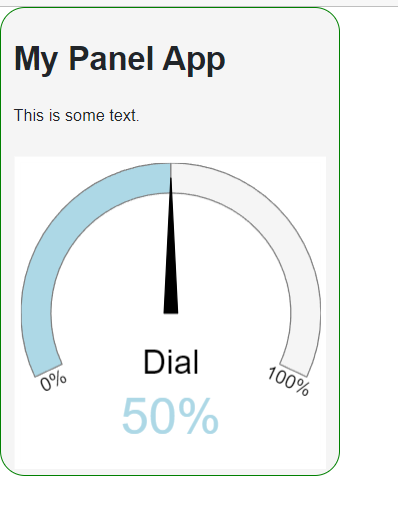
You cannot get an the `Dial` inserted into the `html` like that.
One way to layout html and the `Dial` is to use a `Column`.
```python
import panel as pn
pn.extension()
dial = pn.widgets.Dial(name='Dial', value=50)
html_code = """
My Panel App
This is some text.
"""
pane = pn.Column(
pn.pane.HTML(html_code), dial, styles={
"border": "1px solid green", "border-radius": "20px 20px 20px 20px", "background": "whitesmoke"
}
)
pane.servable()
```
---
**Author:**  [@Marc](https://discourse.holoviz.org/u/Marc)\
**Post date:** [August 24, 2023, 4:32am UTC](https://discourse.holoviz.org/t/can-we-add-an-indicator-to-pn-pane-html/5911/3 "2023-08-24T04:32:44Z")
If you are want/ need to layout something using html, then you should use Panels `ReactiveHTML`.
```python
import panel as pn
import param
from panel.reactive import ReactiveHTML
pn.extension()
class CustomComponent(ReactiveHTML):
object = param.Parameter()
_template = """
My Panel App
This is some text.
${object}
"""
dial = pn.widgets.Dial(name='Dial', value=50)
component = CustomComponent(object=dial, width=500)
component.servable()
```

---
**Author:**  [@BlueBit](https://discourse.holoviz.org/u/BlueBit)\
**Post date:** [August 24, 2023, 7:07pm UTC](https://discourse.holoviz.org/t/can-we-add-an-indicator-to-pn-pane-html/5911/4 "2023-08-24T19:07:18Z")
Thanks a lot @Marc,
very helpful.
One more question, How we can send 2or3 inputs (indicators) to the class?
Here is only one input object: CustomComponent(object=dial, width=500), I mean how to send several Dials/indicators?
---
**Author:**  [@Marc](https://discourse.holoviz.org/u/Marc)\
**Post date:** [August 25, 2023, 9:06am UTC](https://discourse.holoviz.org/t/can-we-add-an-indicator-to-pn-pane-html/5911/5 "2023-08-25T09:06:48Z")
You can wrap them in a layout like a `Column`, `Row` or some grid. And then provide the layout to `object`.
There is also the possibility to turn `object` in to a list of `objects`. Or you might have multiple parameters `object1`, `object2` and `object3` that you can place in specific places in your template.
What is your specific use case?
---
**Author:**  [@BlueBit](https://discourse.holoviz.org/u/BlueBit)\
**Post date:** [August 25, 2023, 10:58am UTC](https://discourse.holoviz.org/t/can-we-add-an-indicator-to-pn-pane-html/5911/6 "2023-08-25T10:58:15Z")
(1) I wish to do it as you recommended (the tail of this message is a code that I faced an error), but I failed to do it. If you are able to leave a few examples of your recommendations (using a wrapper, or list of objects, or multiple parameters), I can refer our students to your solutions for more information. I believe it would be very helpful to Panel learners who wish to work with HTML alongside the Panel.
(2) Are `id="pn-container"` and `id="pn-object"` reserved words in the HTML? Because, when I add a new `div` tag with the same ID (`id="pn-object"`), it gives an error that I cannot use the same ID.
(3) I used the list of objects and the code gives me an error as I expected:
```
import panel as pn
import pandas as pd
pn.extension()
from panel.reactive import ReactiveHTML
import param
class CustomComponent(ReactiveHTML):
object = param.Parameter()
_template = """
My Panel App
This is some text.
${object[0]}
${object[1]}
"""
dial1 = pn.widgets.Dial(name='Dial_1', value = 40)
dial2 = pn.widgets.Dial(name='Dial_2', value = 71)
component = CustomComponent(object = [dial1, dial2], width=500)
component.servable()
```
The error is:
**ValueError: CustomComponent HTML template references unknown parameter ‘object[0]’, similar parameters include [‘object’].**
---
**Author:**  [@ahuang11](https://discourse.holoviz.org/u/ahuang11)\
**Post date:** [August 25, 2023, 2:59pm UTC](https://discourse.holoviz.org/t/can-we-add-an-indicator-to-pn-pane-html/5911/7 "2023-08-25T14:59:04Z")
You can give it a custom ID besides pn-object like `pn-dial-1` `pn-dial-2` etc