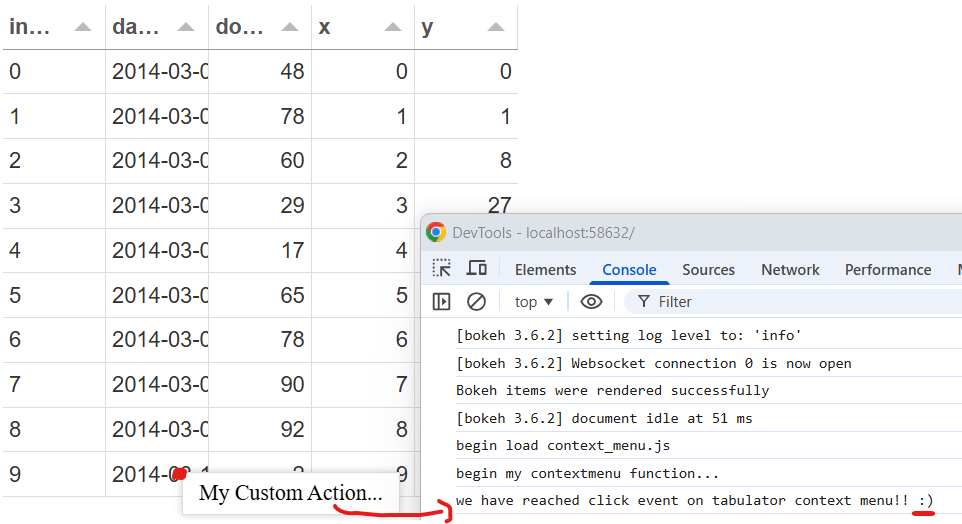
Hello, sorry to revive an old thread. I originally had this same request, “how to achieve a context menu, associated with a Tabulator, with a js callback”, but (I think…) I reached a solution & wanted to share, and also to ask some follow-up Q.
Ultimately I found that callbacks can be hooked up to tabulator-menu on the fly. So adding a mechanism to inject them when .tabulator-menu objects are created seems to work. My MRE is below: by inspecting the browser console I can see that my js callback is reached when I click on the tabulator-menu.
For my application this approach seems acceptable.
I see another unofficial solution is discussed in this feature request. Is it planned to add some “official” python-side mechanism to communicate callbacks to tabulator context menu? Maybe Bokeh CustomJS object could be hijacked somehow? Anyway if it is not planned, I will submit that feature request for “official channels for Tabulator context menu callback functions”.
My MRE to inject callback functions into tabulator-menu on the fly. The mechanism is by selecting all .tabulator-menu, which seem to be created on contextmenu action, and setting .onclick = … function … (line 56 in context_menu.js). Sorry the formatting is not as clean as some of the other posts here…
js/context_menu.js:
// this has to be injected at the end of the DOM
// so that first-time-load captures the loaded tabulators from panel
console.log('begin load context_menu.js');
// thanks to a great example on panel discourse :)
export function select_from_doc(selector, rootNode=document.body) {
    const arr = []

    const traverser = node => {
        // 1. decline all nodes that are not elements
        if(node.nodeType !== Node.ELEMENT_NODE) {
            return
        }

        // 2. add the node to the array, if it matches the selector
        if(node.matches(selector)) {
            arr.push(node)
        }

        // 3. loop through the children
        const children = node.children
        if (children.length) {
            for(const child of children) {
                traverser(child)
            }
        }

        // 4. check for shadow DOM, and loop through it's children
        const shadowRoot = node.shadowRoot
        if (shadowRoot) {
            const shadowChildren = shadowRoot.children
            for(const shadowChild of shadowChildren) {
                traverser(shadowChild)
            }
        }
    }

    traverser(rootNode)
    return arr
}


// example function on click of context menu item
export function my_test_cb(event) {
    console.log('we have reached click event on tabulator context menu!! :)')
}

// i am able to add a listener on the document's contextmenu
// but i am just not sure if this will cause an issue elsewhere?
document.addEventListener('contextmenu', function(event) {
    console.log('begin my contextmenu function...');
    // hook up callbacks from elements of the menu
    var any_cmus = select_from_doc('.tabulator-menu');
    // console.log(any_cmus);
    if (any_cmus.length > 0){
        // we can hook up functions on the fly to tabulator context menu, seemingly...
        any_cmus[0].onclick = my_test_cb
    }
    else{
        console.log('no tabulator-menu were found')
    }
});
main.py:
from pathlib import Path
from datetime import date
from random import randint
import os

import pandas as pd, panel as pn
pn.extension('tabulator')

def make_panel_layout():
    sample_tabul_data = pd.DataFrame(
        dict(
            dates=[date(2014, 3, i+1) for i in range(10)],
            downloads=[randint(0, 100) for i in range(10)],
            x=[k for k in range(10)],
            y=[k**3 for k in range(10)]
        )
    )
    tabl = pn.widgets.Tabulator(
            sample_tabul_data,
            # from https://tabulator.info/docs/5.3/options
            configuration={
                'rowContextMenu': [
                    {
                        'label': "My Custom Action..."
                        # tabulator docs suggest passing a generator function as 'action'
                        #   but i cannot set a 'action', as a function, from python
                        #   because (i assume) it is converted into some string?
                        #   however, i seem to be able to inject a js callback
                        #   into the newly created menu
                        #   which is done in js/context_menu.js
                    }
                ]
            }
    )

    # inject my js code
    #   which hooks up a watcher to global contextmenu
    #   which will modify the .tabulator-menu objects
    inject_js = pn.pane.HTML('''
        <script type="module" src="js/context_menu.js"></script>
    ''')
    local_layout = pn.Column(
        tabl,
        inject_js,
    )
    return local_layout

if __name__ == "__main__":
    js_dir = (
        Path(
            os.path.join(
                Path(__file__).parent,
                r'./js'
            )
        ).resolve()
    )
    pn.serve(
        make_panel_layout,
        static_dirs={
             'js': js_dir,
        }
    )
Finally, I can observe this in my browser  and keep building from there: