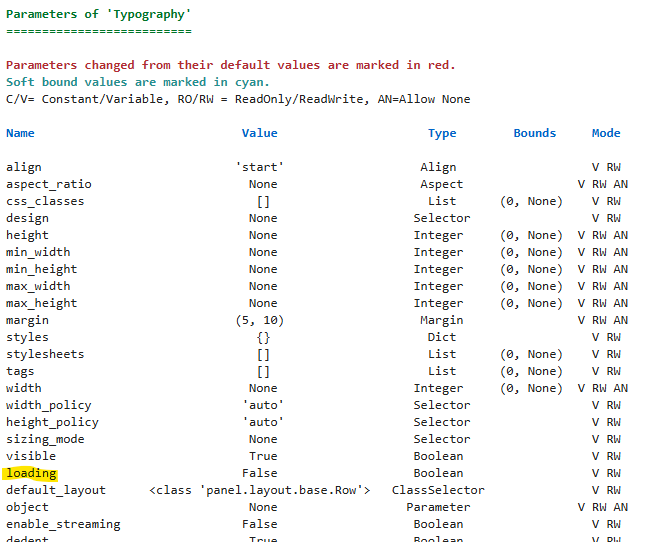
I’m ultimately trying to integrate pmui.Skeleton into my dashboard as a placeholder for pmui.Paper while they’re loading, but I’m struggling to access the ‘loading’ parameter for any Panel pane. My thought was to swap in the Skeleton placeholder contingent on loading=True.
When I try to access loading it seems to be pegged on False. Which didn’t make sense to me because I understood that the ‘loading’ parameter is used in a Viewable object when loading_indicator=True.
import panel as pn
import panel_material_ui as pmui
import time

pn.extension()

def slow_func(event):
    if event:
        time.sleep(2)
        return 'Awake Now'
    return 'Sleeping'

button = pmui.Button(label="Awaken")
bound_button = pn.bind(slow_func, button)

sleep_msg1 = pmui.Typography(bound_button)
#sleep_msg2 = pn.panel(bound_button, loading_indicator=True)

paper1 = pmui.Paper(pmui.Column(
    sleep_msg1,
    button,
),
margin=10,
)

# does not register for sleep_msg1 or sleep_msg2
load_status = pn.indicators.BooleanStatus.from_param(sleep_msg1.param.loading, color='primary')

paper2 = pmui.Paper(pmui.Column(
    pmui.Typography("Loading Status:"),
    load_status,
),
margin=10,
)

pmui.Row(paper1, paper2)
I’m having a hard time understanding exactly what you are trying to achieve.
But below you see one approach for swapping out with a skeleton.
import panel as pn  # Core Panel library for dashboards
import panel_material_ui as pmui  # Material UI extension for Panel
import time  # Used to simulate a slow operation
import param  # Parameterization library for state management

pn.extension()  # Initialize Panel extension (required for widgets)


# State class to track loading status using Param
class State(param.Parameterized):
    loading = param.Boolean(default=False)  # Indicates if a process is loading


# Instantiate the state object
state = State()


# Simulates a slow function that sets loading state
def slow_func(event):
    if event:
        # Set loading to True while sleeping, then reset
        with state.param.update(loading=True):
            time.sleep(20)  # Simulate long-running task
        return 'Awake Now'
    return 'Sleeping'


# Create a Material UI Button
button = pmui.Button(label="Awaken")
# Bind the slow_func to the button's value
bound_button = pn.bind(slow_func, button)


# Message area that updates based on button state
message = pmui.Typography(bound_button, width=300, height=200)
# Skeleton loader shown while loading
skeleton = pmui.Skeleton(width=300, height=100, margin=0, styles={"border": "1px solid black"})


# View function to switch between skeleton and message
def view(loading):
    if loading:
        return skeleton
    return message


# Layout: button and dynamic message/skeleton, make servable for Panel
pmui.Column(button, pn.bind(view, state.param.loading)).servable()
I was hoping to avoid the need to create and update a loading parameter manually (similar to what you showed) and to use the native loading parameter in Panel panes or pmui components.
My idea was that the wrapper should ‘know’ when the bound function it contains is updating. I hoped the loading parameter in pmui.Typography would toggle dynamically when bound_button was updating. I thought this automation may be analogous to:
pn.panel(bound_button, loading_indicator=True)
with the circular progress indicator. I assumed that was a more scalable means to implement customized pmui.Skeleton in lieu of the circular indicator.