I created this example of a publication quality bar chart inspired by A Complete Guide to Bar Charts | Atlassian.
Wanted to share and persist it because it took some experimentation and time to create.
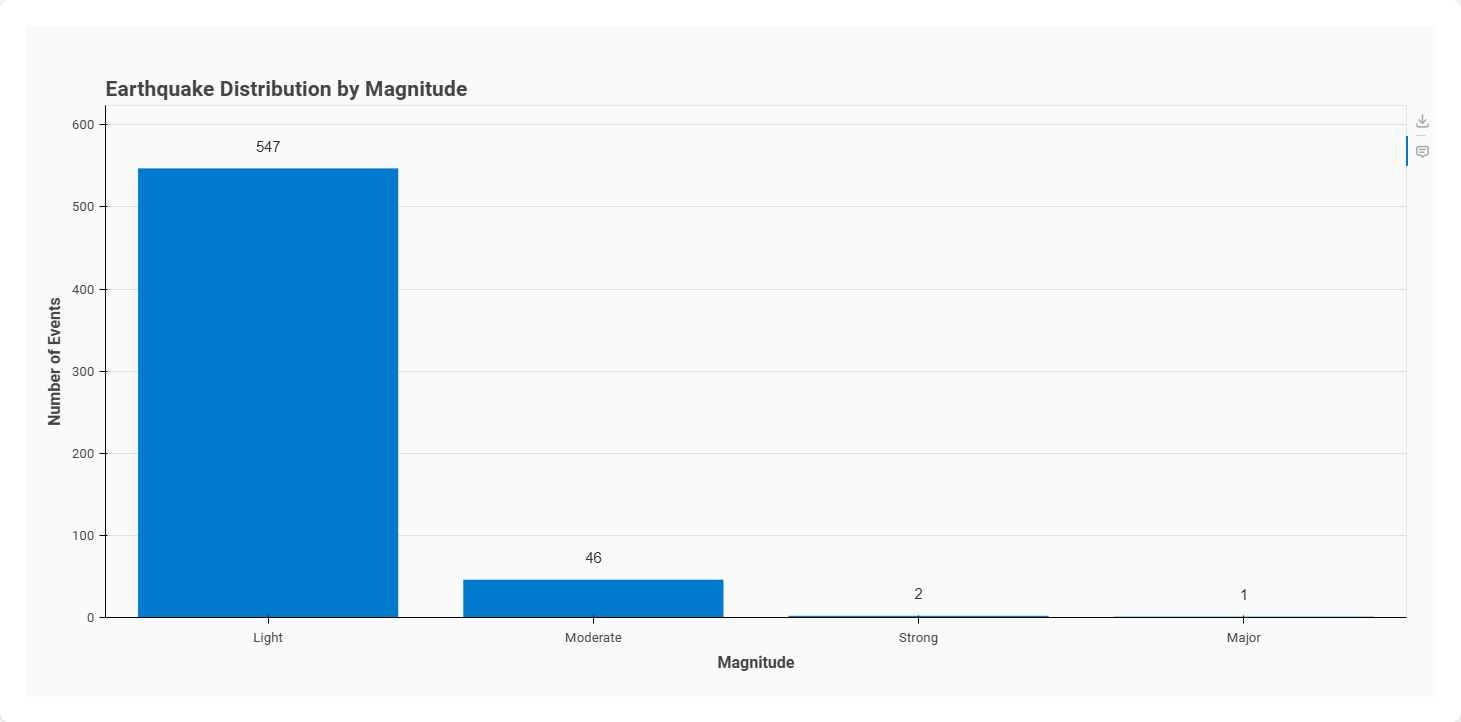
Code
# ============================================================================
# Publication-Quality Bar Chart - hvPlot Best Practices Example
# ============================================================================
# Demonstrates:
# - Data extraction, transformation, and visualization separation
# - Custom Bokeh themes for consistent styling
# - Interactive tooltips with formatted data
# - Text annotations on bars
# - Professional fonts, grids, and axis formatting
# - Panel integration for web serving
# ============================================================================

import hvplot.pandas  # noqa: F401
import panel as pn
import hvsampledata
from bokeh.models.formatters import NumeralTickFormatter
from bokeh.themes import Theme
import holoviews as hv
from holoviews.plotting.bokeh import ElementPlot

# ============================================================================
# BOKEH THEME SETUP - Define global styling
# ============================================================================

ACCENT_COLOR = '#007ACC'  # Professional blue

def create_bokeh_theme(font_family='Roboto', accent_color=ACCENT_COLOR):
    """Create custom theme with specified font. Default: Roboto"""
    return Theme(json={
        'attrs': {
            'Title': {
                'text_font': font_family,
                'text_font_size': '16pt',
                'text_font_style': 'bold'
            },
            'Axis': {
                'axis_label_text_font': font_family,
                'axis_label_text_font_size': '12pt',
                'axis_label_text_font_style': 'bold',
                'major_label_text_font': font_family,
                'major_label_text_font_size': '10pt',
                'major_tick_line_color': "black",  # Remove tick marks
                'minor_tick_line_color': None
            },
            'Plot': {
                'background_fill_color': '#fafafa',
                'border_fill_color': '#fafafa'
            },
            'Legend': {
                'label_text_font': font_family,
                'label_text_font_size': '10pt'
            },
            'Toolbar': {
                "autohide": True,
                "logo": None,
                "stylesheets": [
                    f"""
                    .bk-OnOffButton.bk-active{{
                        border-color: {accent_color} !important;
                    }}
                    """
                ]
            },
            # Does not work via Theme, so added here for reference purposes until I figure out how to do it
            'Tooltip': {
                "stylesheets": [f"""
                    .bk-tooltip-row-label {{
                        color: {ACCENT_COLOR} !important;
            }}"""]

            }
        }
    })

# Apply theme globally - affects all plots
hv.renderer('bokeh').theme = create_bokeh_theme()

# ============================================================================
# HOLOVIEWS OPTS SETUP - Define global configuration
# ============================================================================

GLOBAL_BACKEND_OPTS={
    'plot.xgrid.visible': False,           # Only horizontal grid lines
    'plot.ygrid.visible': True,
    'plot.ygrid.grid_line_color': "black",
    'plot.ygrid.grid_line_alpha': 0.1,
    'plot.min_border_left': 80,            # Add padding on left (for y-axis label)
    'plot.min_border_bottom': 80,          # Add padding on bottom (for x-axis label)
    'plot.min_border_right': 30,           # Add padding on right
    'plot.min_border_top': 80,             # Add padding on top
}

ElementPlot.param.backend_opts.default = GLOBAL_BACKEND_OPTS
ElementPlot.param.yformatter.default = NumeralTickFormatter(format='0a')  # 1k,

hv.opts.defaults(
    hv.opts.Bars(
        color=ACCENT_COLOR,           # Professional blue
        line_color=None,            # Remove bar borders
    ),
    hv.opts.Labels(
        text_baseline='bottom',
        text_font_size='11pt',
        text_font_style='normal',
        text_color='#333333',
    ),
)
hv.Cycle.default_cycles["default_colors"] = [ACCENT_COLOR, '#00948A', '#7E59BD', '#FFA20C', '#DA4341', '#D6F1FF', '#DAF5F4', '#F0E8FF', '#FFF8EA', '#FFF1EA', '#001142', '#003336', '#290031', '#371F00', '#3A0C13']

# ============================================================================
# DATA PIPELINE - Separate extraction, transformation, and plotting
# ============================================================================

def get_earthquake_data():
    """Extract raw earthquake data from sample dataset"""
    return hvsampledata.earthquakes("pandas")


def aggregate_by_magnitude(earthquake_data):
    """Transform: Group earthquakes by magnitude class with statistics"""

    # Aggregate: count events and calculate average depth per magnitude class
    aggregated = (
        earthquake_data
        .groupby('mag_class', observed=True)
        .agg({'mag': 'count', 'depth': 'mean'})
        .reset_index()
        .rename(columns={'mag': 'event_count', 'depth': 'avg_depth'})
        .sort_values('event_count', ascending=False)
    )

    # Add percentage column for tooltips
    aggregated['percentage'] = (
        aggregated['event_count'] / aggregated['event_count'].sum() * 100
    )

    return aggregated


def create_bar_chart(aggregated_data):
    """Create publication-quality bar chart with labels and tooltips"""

    default_tools=['save']

    # Main bar chart with professional styling
    bar_chart = aggregated_data.hvplot.bar(
        x='mag_class',
        y='event_count',

        # Titles and labels
        title='Earthquake Distribution by Magnitude',
        xlabel='Magnitude',
        ylabel='Number of Events',

        # Interactivity
        hover_cols = ["mag_class", "event_count", "percentage", "avg_depth"],
        hover_tooltips=[
            ('Magnitude', '@mag_class'),
            ('Events', '@event_count{0,0}'),      # Format: 1,234
            ('Percentage', '@percentage{0 a}%'), # Format: 45.7%
            ('Avg Depth', '@avg_depth{0f} km')  # Format: 99 km
        ],
    ).opts(default_tools=default_tools)

    # Add text labels above bars
    labels_data = aggregated_data.copy()
    labels_data['label_y'] = labels_data['event_count'] + 20  # Offset above bars

    text_labels = labels_data.hvplot.labels(
        x='mag_class',
        y='label_y',
        text='event_count',
        hover_cols = ["mag_class", "event_count"],
        hover_tooltips=[
            ('Magnitude', '@mag_class'),
            ('Events', '@event_count{0,0}'),      # Format: 1,234
        ],
    ).opts(default_tools=default_tools)

    # Overlay: bar chart * text labels
    return bar_chart * text_labels


def create_plot():
    """Main function: Extract → Transform → Plot"""
    # Extract: Get raw data
    earthquake_data = get_earthquake_data()

    # Transform: Aggregate and calculate statistics
    aggregated = aggregate_by_magnitude(earthquake_data)

    # Visualize: Create publication-quality chart
    chart = create_bar_chart(aggregated)

    return chart


# ============================================================================
# PANEL APP SETUP
# ============================================================================

# Serve the chart when running with Panel
if pn.state.served:
    # Load Panel JavaScript extensions
    pn.extension()

    # Apply custom Bokeh theme (override the global theme)
    # Create and serve the chart
    chart = create_plot()
    pn.panel(chart, sizing_mode="stretch_both", margin=25).servable()
Serve with
panel serve script.py
I could not
- Figure out how to set the color of the tooltip text (change it from light blue to ACCENT_COLOR)
- Add additional tooltips to the labels. See HoloViews #6769