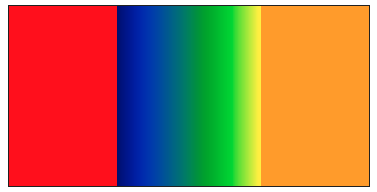
Maybe @jbednar or @philippjfr can chime in if there’s a less cumbersome approach, but you could avoid HoloViews and Bokeh altogether by filtering the highs and lows out and stacking the resulting images.
import numpy as np
import pandas as pd
import datashader as ds
import datashader.transfer_functions as tf
import colorcet as cc

N = 500
low_thresh = 3
high_thresh = 7

xs = np.linspace(0, 10, N)
ys = np.linspace(0, 10, N)
X, Y = np.meshgrid(xs, ys)
val = X.ravel()

df = pd.DataFrame({
    'x': X.ravel(),
    'y': Y.ravel(),
    'val': val,
})

canvas = ds.Canvas(plot_width=400, plot_height=200, x_range=(0, 10), y_range=(0, 10))
agg = canvas.points(df, 'x', 'y', agg=ds.mean('val'))

agg_in = agg.where((agg >= low_thresh) & (agg <= high_thresh))
img_in = tf.shade(agg_in, cmap=cc.bgy, span=(low_thresh, high_thresh), how='linear')

agg_low = agg.where(agg < low_thresh)
img_low = tf.shade(agg_low, cmap=["red"])

agg_high = agg.where(agg > high_thresh)
img_high = tf.shade(agg_high, cmap=["orange"])

final_img = tf.stack(img_low, img_in, img_high)

final_img