sorin
October 3, 2022, 6:34pm
1
Hello All,
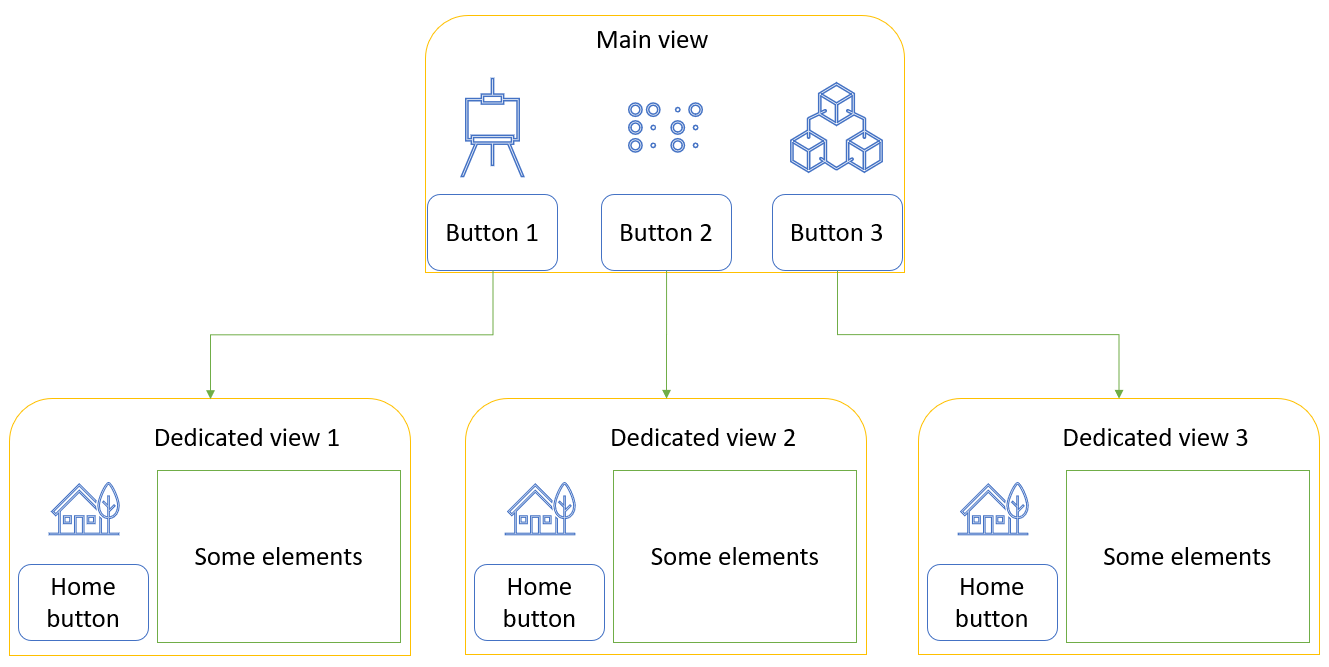
I would like to know what are the best practices with panel, to create a one-page application (serve a single file) which will have some similar architecture as below:
A page (Main view), where there would be buttons/links which when clicked will bring up new pages with dedicated views, from where you can get back to homepage by clicking another button.
As said, I am interested in the best practices or even a link to a tutorial if someone has to point me to.
Thank you!
1 Like
Hoxbro
October 4, 2022, 8:52am
2
A way to do this is by initializing a pn.Row or pn.Column and updating the content of that with the button click.
import panel as pn

pn.extension()

main_page = pn.Row()

home_button = pn.widgets.Button(name="Home")
page1_button = pn.widgets.Button(name="Page 1")
page2_button = pn.widgets.Button(name="Page 2")


def homepage(event=None):
    main_page[:] = [pn.Row(pn.Column(page1_button, page2_button), "Home")]


def page1(event=None):
    main_page[:] = [pn.Row(home_button, "Page 1")]


def page2(event=None):
    main_page[:] = [pn.Row(home_button, "Page 2")]


home_button.on_click(homepage)
page1_button.on_click(page1)
page2_button.on_click(page2)

homepage()  # Fill the first
main_page
1 Like
sorin
October 4, 2022, 11:05am
3
@Hoxbro , thank you for your suggestion.
and also the code I am using:
import panel as pn

pn.extension()

home_button_active = pn.widgets.Button(name='\u2302 Home', button_type='primary')
home_button_inactive = pn.widgets.Button(name='\u2302 Home')
failure_rate_button_active = pn.widgets.Button(name='📈 Failure rate', button_type='primary')
failure_rate_button_inactive = pn.widgets.Button(name='📈 Failure rate')
reports_button_active = pn.widgets.Button(name='📁 Reports', button_type='primary')
reports_button_inactive = pn.widgets.Button(name='📁 Reports')

toolbar_row = pn.Row()

main_page = pn.Row()


def homepage(event=None):
    toolbar_row[:] = [
        home_button_active,
        failure_rate_button_inactive,
        reports_button_inactive
    ]
    main_page[:] = [
        toolbar_row,
        pn.pane.Str('Section dedicated to homepage')
    ]


def failure_rate_page(event=None):
    toolbar_row[:] = [
        home_button_inactive,
        failure_rate_button_active,
        reports_button_inactive
    ]
    main_page[:] = [
        toolbar_row,
        pn.pane.Str('Section dedicated to failure rate')
    ]


def reports_page(event=None):
    toolbar_row[:] = [
        home_button_inactive,
        failure_rate_button_inactive,
        reports_button_active
    ]
    main_page[:] = [
        toolbar_row,
        pn.pane.Str('Section dedicated to reports')
    ]


home_button_inactive.on_click(homepage)
failure_rate_button_inactive.on_click(failure_rate_page)
reports_button_inactive.on_click(reports_page)

homepage()

template = pn.template.FastListTemplate(
    site="Dashboard",
    title="",
    main=main_page
)

template.servable()
I believe I am missing something, because the toolbar_row is changing when clicking the buttons.
If you see what I am doing wrong, please let me know.
Hoxbro
October 4, 2022, 11:35am
4
I will take a look at it later.
But it looks like you are trying to recreate pn.Tabs. Are you sure that it is not what you want to use?
sorin
October 4, 2022, 11:41am
5
I was about to write that I got it to work, by using section_row = pn.Row() alongside the toolbar_row.section_row
section_row[:] = [
    pn.pane.Str('Section dedicated to homepage')
]
main_page[:] = [
    toolbar_row,
    section_row
]
You are correct that it feels like rewriting the pn.Tabs - I am not sure to be honest (I am experimenting). At the moment, I am not sure what level of customization is supported within pm.Tabs - I will look into this more careful.
2 Likes