I came across anymap-ts recently and had to try it with Panel. It’s an anywidget-based Python package that gives you a unified API across 8 different mapping libraries:
| Backend | Type | Notes |
|---|---|---|
| MapLibre | Vector tiles | Free, GPU-accelerated, 3D pitch |
| Leaflet | Raster tiles | Classic, lightweight |
| DeckGL | GPU layers | Large-scale data viz |
| OpenLayers | Full-featured | OGC standards support |
| Mapbox | Vector tiles | Requires API token |
| Cesium | 3D globe | Requires ion token |
| KeplerGL | Geospatial analytics | Uber’s vis framework |
| Potree | Point clouds | LiDAR visualization |
The cool part: you write Map(center=..., zoom=...) once, and swap backends by changing the class. Draw controls, basemaps, GeoJSON, arc layers — same API everywhere.
Installation
pip install panel watchfiles ipywidgets_bokeh setuptools anymap-ts
Note: setuptools is needed until ipywidgets_bokeh#125 has been resolved.
Getting Started
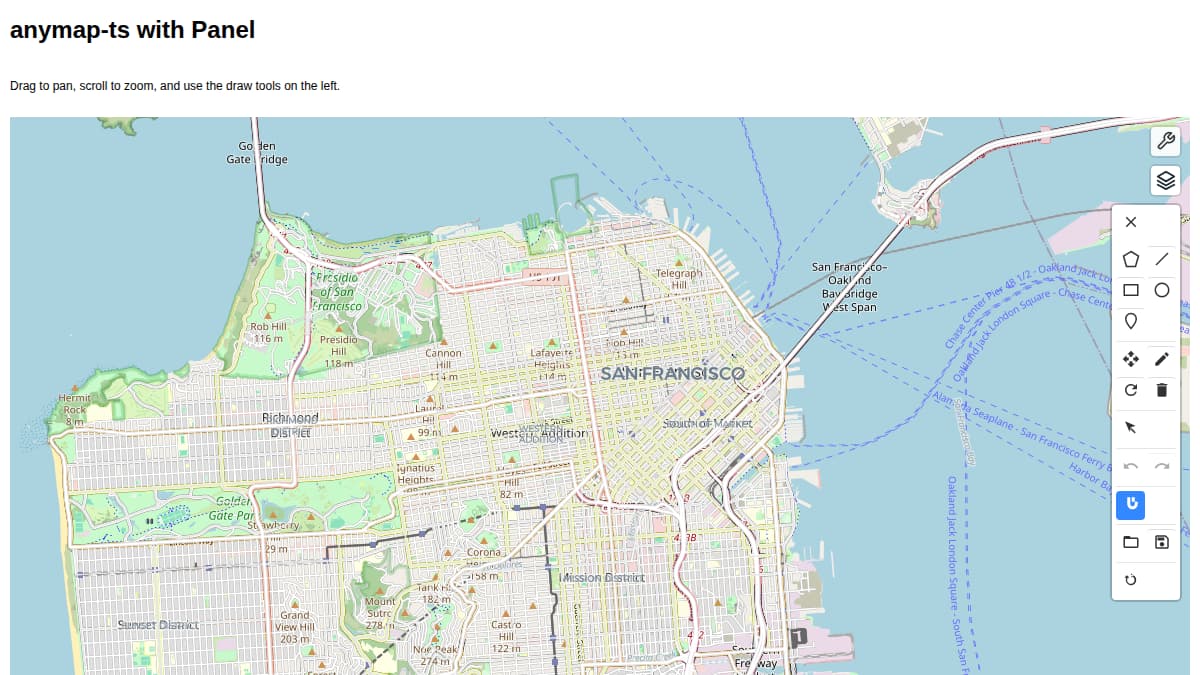
Here’s a minimal example — a MapLibre map of San Francisco with draw tools:
import panel as pn
from anymap_ts import Map

pn.extension("ipywidgets", sizing_mode="stretch_width")

m = Map(center=[-122.4194, 37.7749], zoom=12)
m.add_basemap("OpenStreetMap")
m.add_draw_control()
m.add_layer_control()

map_pane = pn.pane.IPyWidget(m, sizing_mode="stretch_width", height=600)

pn.Column(
    "# anymap-ts with Panel",
    "Drag to pan, scroll to zoom, and use the draw tools on the left.",
    map_pane,
    sizing_mode="stretch_width",
).servable()
Run it with panel serve anymap_panel_getting_started.py --dev — you get a MapLibre map with drawing tools and layer control.
A Bigger Example: Multi-Backend Flight Map
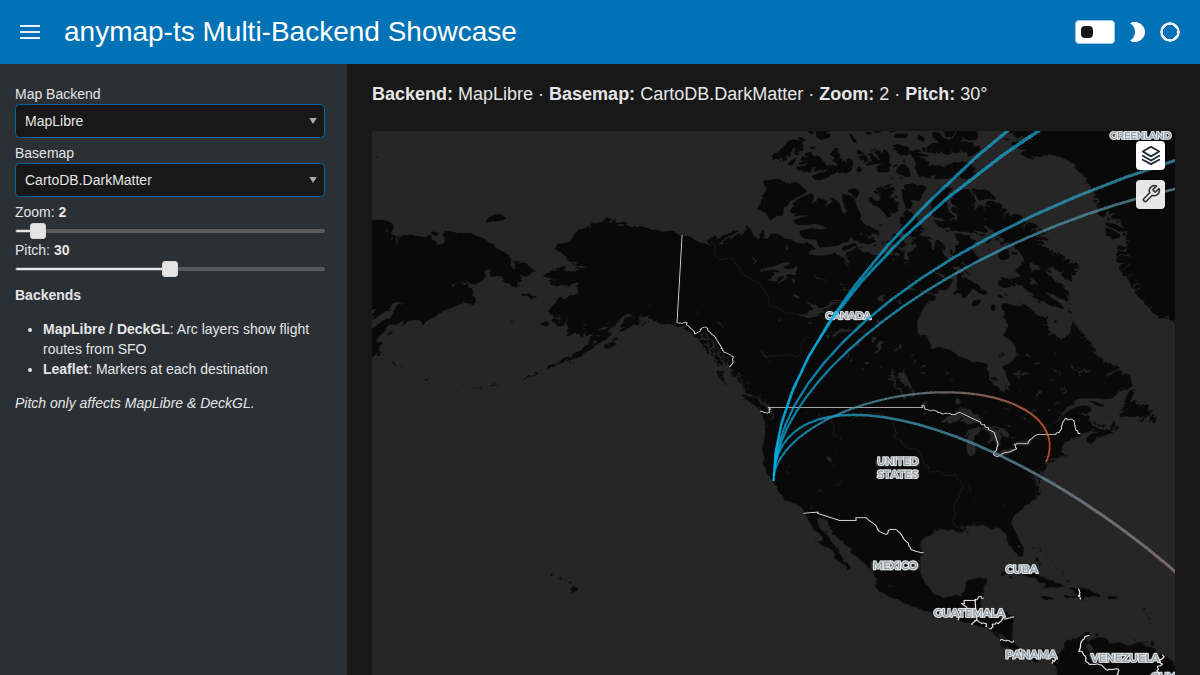
This is where anymap-ts really shines. The same flight-route data rendered on three different backends, switchable with a Panel dropdown:
- MapLibre / DeckGL — arc layers showing flight routes from SFO with 3D pitch
- Leaflet — markers at each destination city
The app uses a FastListTemplate with a dark theme for a polished look, sidebar controls, a dynamic status bar showing the current settings, and a theme toggle.
Full code (click to expand)
import panel as pn
from anymap_ts import DeckGLMap, LeafletMap, MapLibreMap

pn.extension("ipywidgets", sizing_mode="stretch_width", throttled=True)

# Flight routes from San Francisco to major world cities
SFO = [-122.4194, 37.7749]
DESTINATIONS = {
    "New York": [-73.9857, 40.7484],
    "London": [-0.1278, 51.5074],
    "Tokyo": [139.6917, 35.6895],
    "Sydney": [151.2093, -33.8688],
    "Dubai": [55.2708, 25.2048],
    "Sao Paulo": [-46.6333, -23.5505],
}

ARC_DATA = [
    {"source": SFO, "target": dest, "name": name}
    for name, dest in DESTINATIONS.items()
]

# -- Widgets --
backend_select = pn.widgets.Select(
    name="Map Backend",
    options=["MapLibre", "Leaflet", "DeckGL"],
    value="MapLibre",
)
basemap_select = pn.widgets.Select(
    name="Basemap",
    options=["CartoDB.DarkMatter", "OpenStreetMap"],
    value="CartoDB.DarkMatter",
)
zoom_slider = pn.widgets.FloatSlider(
    name="Zoom", start=1, end=15, step=0.5, value=2,
)
pitch_slider = pn.widgets.IntSlider(
    name="Pitch", start=0, end=60, step=5, value=30,
)

SOURCE_COLOR = [0, 180, 235, 200]
TARGET_COLOR = [255, 100, 50, 200]


def create_map(backend, basemap, zoom, pitch):
    """Create a map widget for the selected backend with flight data."""
    kwargs = dict(center=SFO, zoom=zoom)

    if backend == "MapLibre":
        m = MapLibreMap(**kwargs, pitch=pitch)
        m.add_basemap(basemap)
        m.add_arc_layer(
            ARC_DATA,
            name="flights",
            get_source_position="source",
            get_target_position="target",
            get_source_color=SOURCE_COLOR,
            get_target_color=TARGET_COLOR,
            get_width=2,
        )
    elif backend == "DeckGL":
        m = DeckGLMap(**kwargs, pitch=pitch)
        m.add_basemap(basemap)
        m.add_arc_layer(
            ARC_DATA,
            name="flights",
            get_source_position="source",
            get_target_position="target",
            get_source_color=SOURCE_COLOR,
            get_target_color=TARGET_COLOR,
            get_width=2,
        )
    else:  # Leaflet
        m = LeafletMap(**kwargs)
        m.add_basemap(basemap)
        for route in ARC_DATA:
            lng, lat = route["target"]
            m.add_marker(lng, lat, popup=route["name"])

    return pn.pane.IPyWidget(m, sizing_mode="stretch_width", height=550)


map_pane = pn.bind(
    create_map,
    backend=backend_select,
    basemap=basemap_select,
    zoom=zoom_slider,
    pitch=pitch_slider,
)


def status_text(backend, basemap, zoom, pitch):
    return (
        f"**Backend:** {backend} · **Basemap:** {basemap} · "
        f"**Zoom:** {round(zoom,2)} · **Pitch:** {pitch}°"
    )


status_md = pn.pane.Markdown(
    pn.bind(status_text, backend_select, basemap_select, zoom_slider, pitch_slider),
    styles={"font-size": "18px"},
)

sidebar_info = pn.pane.Markdown(
    "**Backends**\n\n"
    "- **MapLibre / DeckGL**: Arc layers show flight routes from SFO\n"
    "- **Leaflet**: Markers at each destination\n\n"
    "*Pitch only affects MapLibre & DeckGL.*"
)

pn.template.FastListTemplate(
    title="anymap-ts Multi-Backend Showcase",
    sidebar=[backend_select, basemap_select, zoom_slider, pitch_slider, sidebar_info],
    main=[status_md, map_pane],
    accent_base_color="#0072B5",
    theme="dark",
    theme_toggle=True,
    main_layout=None,
).servable()
The integration pattern is the same one used in the PyGlobeGL showcase: pn.extension("ipywidgets") + pn.pane.IPyWidget(widget). Since anymap-ts is built on anywidget, which implements the ipywidgets protocol, it just works.
pn.bind() recreates the map whenever a widget changes — necessary since switching backends means creating a new widget instance. The throttled=True option in pn.extension() ensures sliders only fire on mouse-up, not on every pixel drag.
Links
- anymap-ts GitHub — docs, examples, and the full list of supported backends
- Panel IPyWidget docs — the bridge that makes this work
- ipywidgets_bokeh — the underlying anywidget/ipywidgets-to-Bokeh adapter